
తెలుగు poster — 6 సులభమైన steps
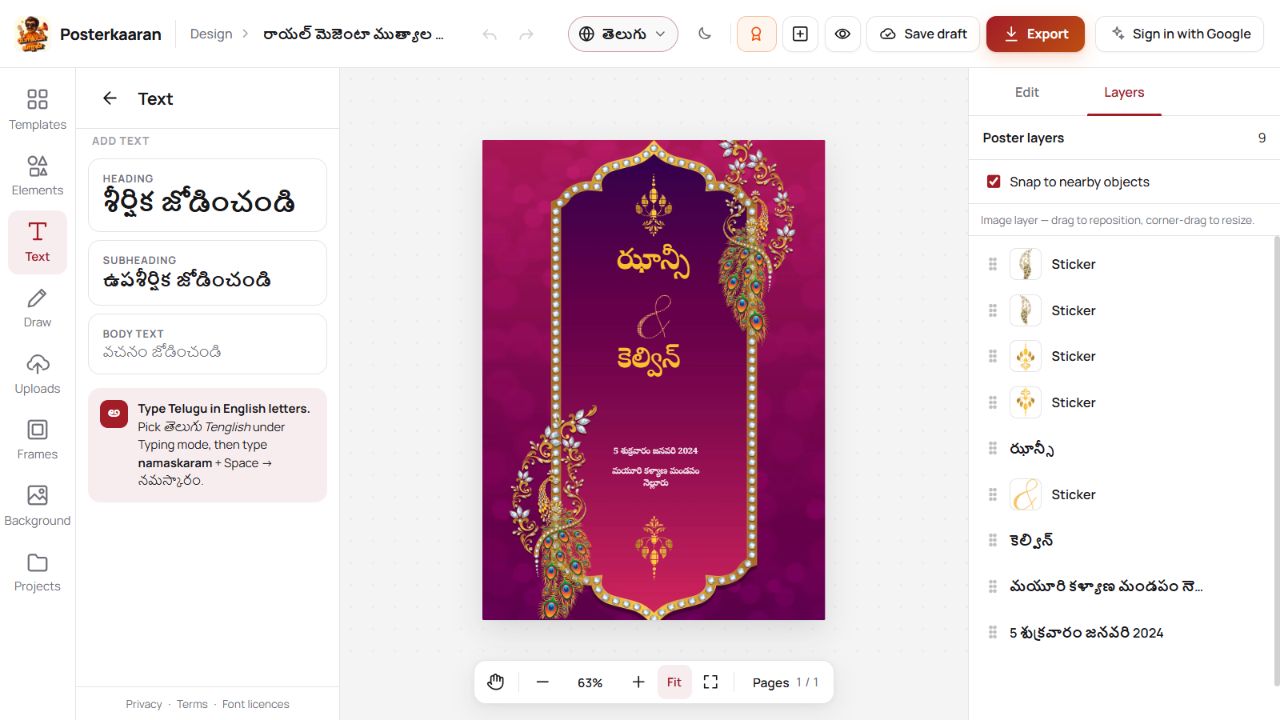
- తెలుగు టెంప్లేట్ ఎంచుకోండిposterkaaran.com/telugu-poster-maker లో పుట్టినరోజు, పెళ్లి, సీమంతం, దీపావళి వంటి కేటగిరీల్లో నచ్చిన డిజైన్ ఎంచుకోండి.
- Customize నొక్కండిటెంప్లేట్ ఎడిటర్లో తెరుచుకుంటుంది. భాష "తెలుగు" గా ఉందో లేదో పైన గ్లోబ్ బటన్లో సరిచూసుకోండి.
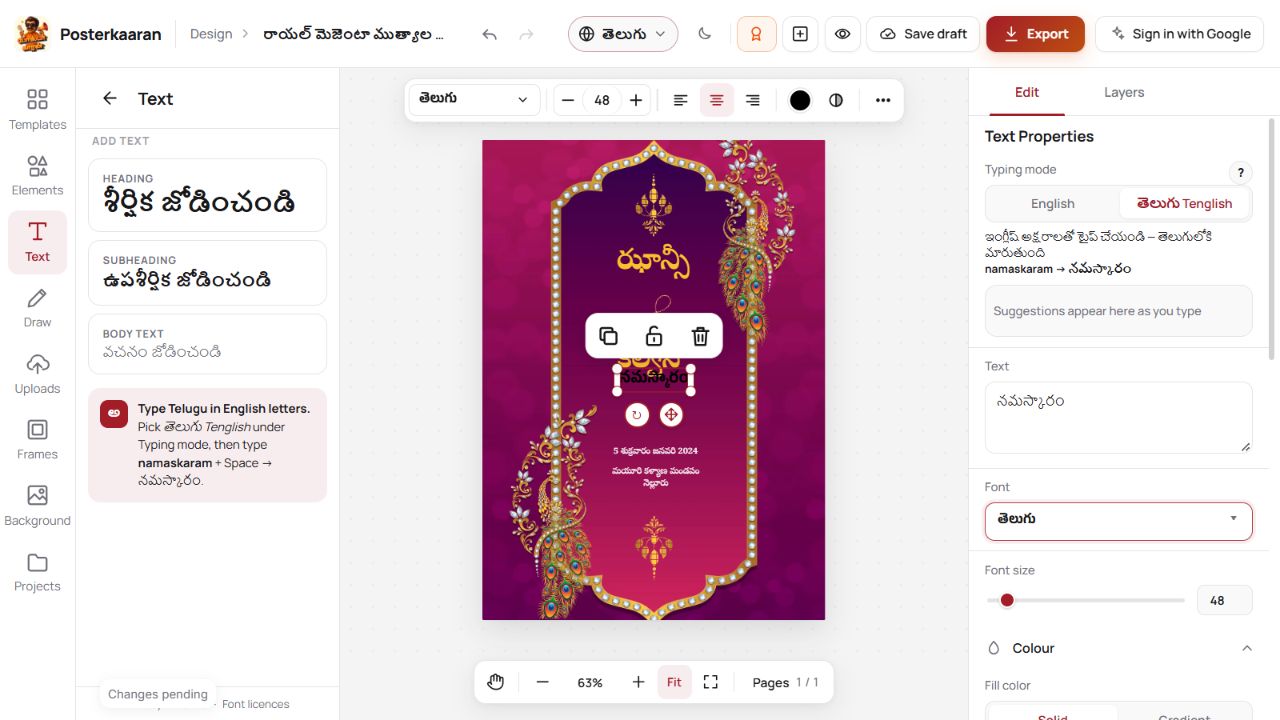
- తెలుగులో టైప్ చేయండిటెక్స్ట్ పై రెండుసార్లు క్లిక్ చేసి, టైపింగ్ మోడ్లో "తెలుగు Tenglish" ఎంచుకోండి. English అక్షరాలతో టైప్ చేసి Suggestions లో సరైన పదం ఎంచుకోండి. Suggestions రాకపోతే తెలుగు keyboard నుండి text copy చేసి Edit లో Text field లో paste చేయండి.
- Font & రంగు మార్చండిFont బటన్లో తెలుగు ఫాంట్స్ ట్యాబ్ ఎంచుకోండి. రంగు, సైజ్, షాడో మీ ఇష్టం.
- ఫోటో పెట్టండిUploads నుండి మీ ఫోటో యాడ్ చేసి, సరైన చోటుకి లాగండి. బ్యాక్గ్రౌండ్ రిమూవ్ కూడా చేసుకోవచ్చు.
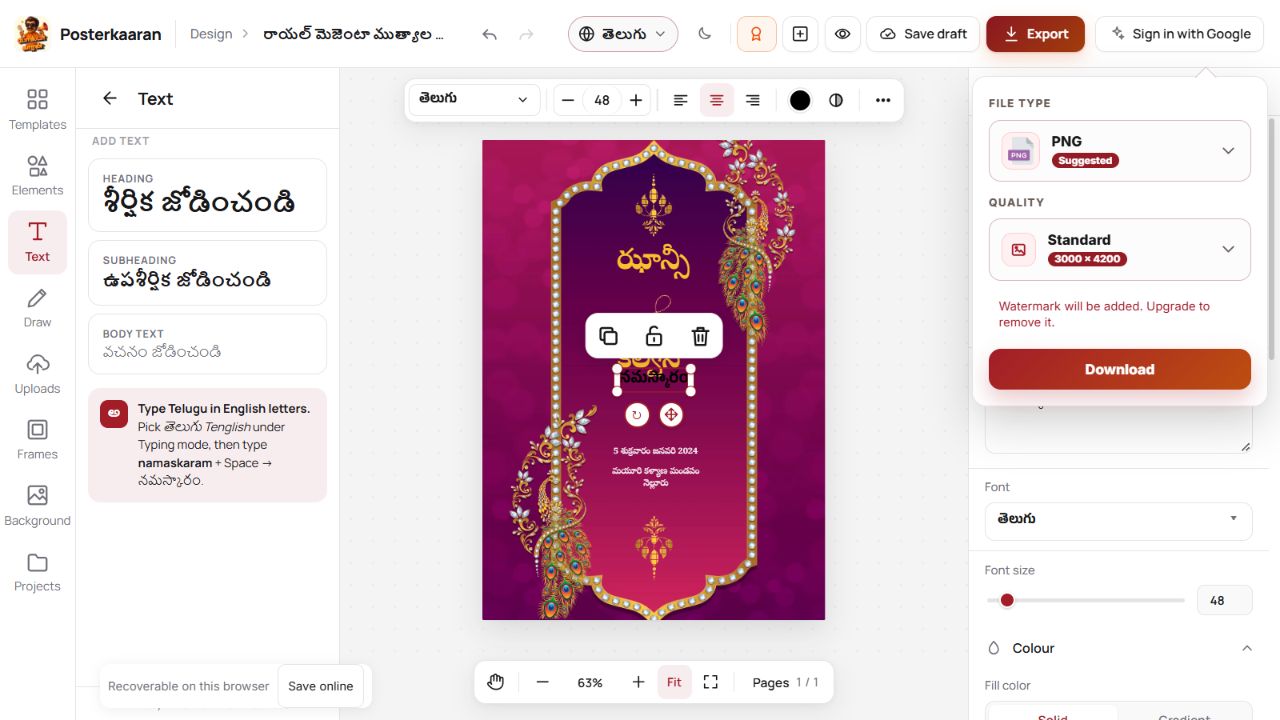
- డౌన్లోడ్ చేసి పంపండిExport తెరిచి మీ plan, platform కు అందుబాటులో ఉన్న format ఎంచుకోండి. PNG / JPG / PDF, Watermark, HD లభ్యత editor options పై ఆధారపడి ఉంటుంది. Preview చేసి download చేయండి.
తెలుగు Editor — నిజమైన ఉదాహరణ
Example captured on 14 October 2026 in the web editor, with Telugu selected and no account signed in. Replace the sample names, date and venue before sharing your own invitation.
ఏం రాయాలో ఆలోచనలు కావాలా?
తరచుగా అడిగే ప్రశ్నలు
తెలుగు పోస్టర్ free గా తయారు చేయవచ్చా?
అవును. Free templates edit చేసి download చేసుకోవచ్చు. PRO లో watermark లేని HD exports, అన్ని premium templates ఉంటాయి. Free template ఎంచుకోండి; Watermark, HD, file formats మీ plan, platform మరియు editor options పై ఆధారపడి ఉంటాయి.
తెలుగు keyboard లేకుండా తెలుగులో ఎలా type చేయాలి?
"తెలుగు Tenglish" typing mode లో English అక్షరాలతో type చేసి Suggestions లో సరైన పదం ఎంచుకోండి. Suggestions అందుబాటులో లేకపోతే తెలుగు keyboard నుండి text copy చేసి Text field లో paste చేయండి.
Mobile లో పనిచేస్తుందా?
అవును. design.posterkaaran.com mobile browser లో కూడా పనిచేస్తుంది. App install అవసరం లేదు.
ఏ ఏ తెలుగు templates ఉన్నాయి?
పుట్టినరోజు, పెళ్లి పత్రిక, సీమంతం, కర్ణవేధ, పెద్దమనిషి వేడుక, గృహప్రవేశం, దసరా, దీపావళి, శ్రద్ధాంజలి, షాప్ ప్రారంభోత్సవం, విజిటింగ్ కార్డ్, ప్రశంసా పత్రం (సర్టిఫికెట్) మరియు మరిన్ని.
ఇప్పుడే మీ తెలుగు poster తయారు చేయండి
Free templates, తెలుగు fonts, తెలుగులో type చేసే సౌకర్యం — అన్నీ ఒకే చోట.
అన్ని తెలుగు Templates →